
How to Convert CMYK to Pantone (and Why It’s Never Exact)

By the Dimpal Sharma· Published 26 October 2026 · Updated 30 October 2026 · 8 min read

A client sends you a logo in CMYK and asks for the Pantone number. Simple request. Annoying answer.

You can't convert CMYK to Pantone the way you'd convert inches to centimeters. What you can do is find the Pantone ink that sits closest to your CMYK mix, and that's a different job with a few traps in it.

Designers have argued about this in forum threads for well over a decade. The answer from people who print for a living hasn't moved much, so here it is, checked against Pantone's own guides.

Can you convert CMYK to Pantone?

Not exactly. Pantone is a set of pre-mixed spot inks and CMYK is a blend of four process inks, so you can only find the closest Pantone match to a CMYK value. Use the Pantone library in Illustrator or Photoshop to find it, check it against a physical swatch book, and confirm with your printer.

That's the short version. The rest of this is about doing it without getting burned.

What's the difference between CMYK and Pantone?

CMYK is a process color model. It mixes cyan, magenta, yellow and black ink to make other colors. Pantone, formally the Pantone Matching System (PMS), is a standard library of spot colors. Each one is a single pre-mixed ink with its own number.

Printers call the first approach process color and the second spot color. Here's how they compare.

CMYK (process)Pantone (spot)
How the color is madeFour inks printed as tiny dotsOne pre-mixed ink applied as a solid
Color rangeNarrowerWider, especially in saturated oranges and blues
ConsistencyShifts with press profile and paperFollows a fixed ink recipe
Extra costNone, it uses the standard four unitsUsually needs an extra unit on press
Best forPhotos, gradients and most everyday jobsBrand-critical colors and logos

Why doesn't CMYK match Pantone exactly?
A Pantone color is one ink, mixed ahead of time to a fixed recipe. CMYK builds a color from four inks laid down as tiny dots, and your eye does the blending.

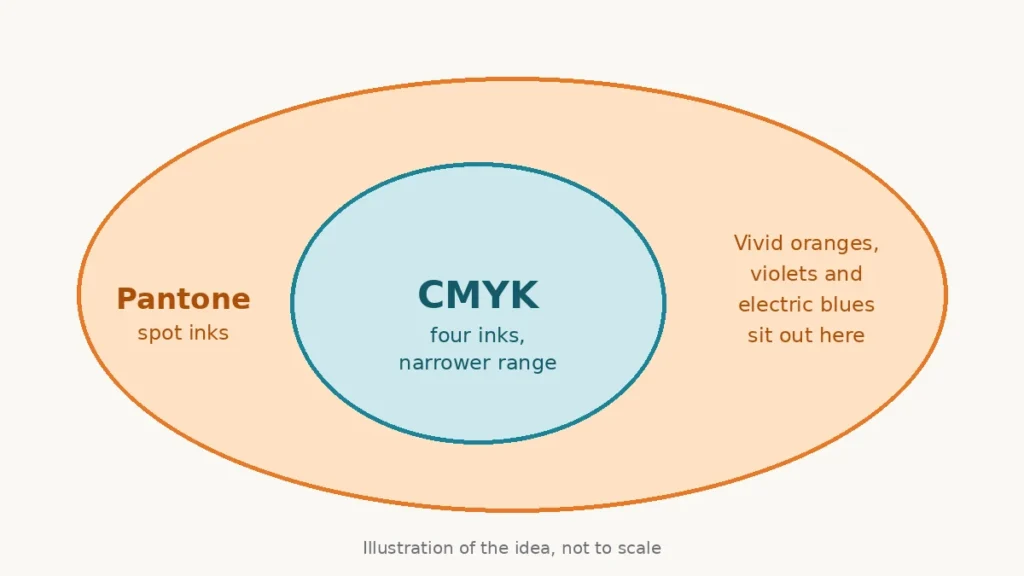
That's the first gap. The second is range. Pantone's inks reach saturated oranges and bright blues that four-color process simply can't print. One forum regular pointed to oranges and violets as the hardest to get right.

Take Pantone 021 C, a bright orange. Its closest CMYK build is roughly 0/53/100/0, and the result looks visibly duller than the real ink.

Diagram showing the CMYK color range as a smaller oval inside the wider range of Pantone spot inks, with vivid oranges, violets and electric blues sitting outside CMYK
Pantone's range stretches past what four-color CMYK can print.

There's one more snag that rarely gets mentioned. A CMYK number isn't a single color. It shifts with the press profile and the paper, so the same four numbers can print differently on two different setups.

What should you check before you start?

Two things. Is the job going on coated or uncoated paper, and which CMYK profile was the artwork built in?

Pantone sells separate coated and uncoated guides because the same number looks different on each. Pick the library that matches the stock. If you don't know the stock, ask the printer first, before you spend an hour matching the wrong one.

How do you convert CMYK to Pantone, step by step?

Here's the route at a glance.
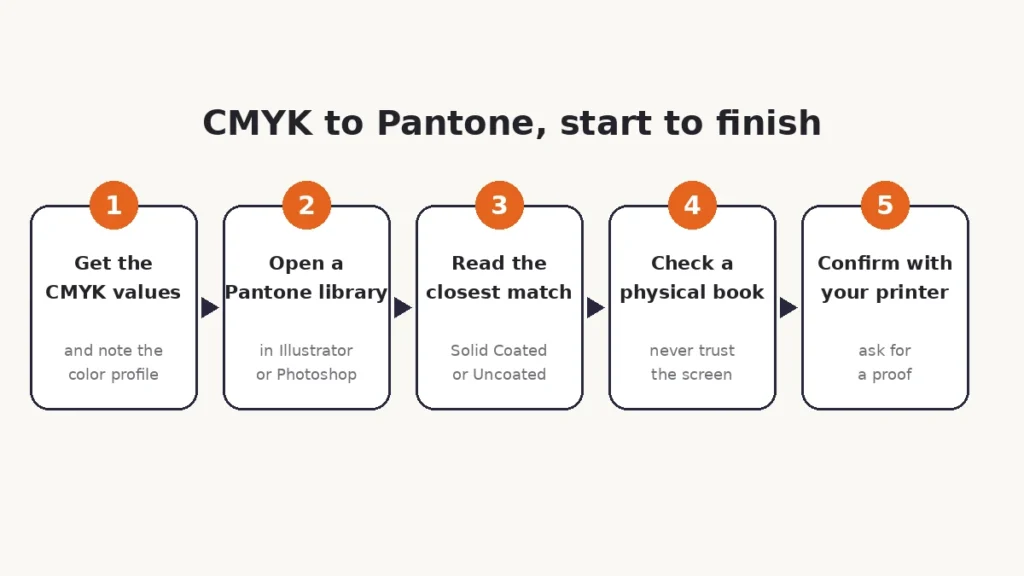
The whole process on one line.
  1. Write down the CMYK values and the paper. Four numbers and one stock. You'll need both.
  2. Use the Pantone library in Adobe. In Photoshop, click the foreground color, type in your CMYK values, then open Color Libraries and choose a Pantone book. Solid Coated is the usual starting point. In Illustrator, select the object and go to Edit > Edit Colors > Recolor Artwork, then pick a Pantone library to find the nearest swatch. For a two-color job, Recolor with Preset > 2 Color does most of the work.
  3. No Adobe? Try a free online converter. Type in the CMYK values and it returns the closest Pantone colors with a Delta E score, which measures how far apart two colors look. Lower is better. One converter matched CMYK 0/100/79/4 to Pantone 185 C at a Delta E of 5.6. Treat results like that as a shortlist, not a verdict.
  4. Check the shortlist against a physical swatch book. A screen can't show true Pantone color. The Formula Guide is the book for picking an ink. The Color Bridge guide goes the other way and shows a spot color next to its closest CMYK, which helps you judge how far apart the two really are.
  5. Send it to the printer and ask for a proof. They know their press. Even in forum threads about this exact problem, the first reply is often just: have you talked to the print shop?

How close is close enough?

That depends on who's looking. Your printer cares about Delta E. Your client cares about whether the logo still looks like their logo.

Someone who tried an online converter on a forum said the results ranged from a near match to nothing close at all. A low score usually means you're fine. A high score means the color sits outside what CMYK can reach, and no setting will change that.

Delta E has rough bands, though sources draw the lines a little differently. This table follows common color-guide ranges.

Delta EWhat you'll see
Under 1Not perceptible to the eye
1 to 2Only noticeable on close inspection, often by experts
2 to 3Small difference, visible side by side
3 to 5Noticeable in normal viewing
5 to 10Significant difference, the colors clearly differ
Over 10The colors look completely different

Now run the earlier converter example through it. CMYK 0/100/79/4 landed on Pantone 185 C at a Delta E of 5.6, which falls in the significant band. You'd see that gap. For a logo, treat it as your cue to compare real swatches before you promise the client anything.

Why does the printer's profile matter so much?

Color-management people on the Adobe forums keep repeating the same advice. Start from the color's L*a*b* values, then convert to the actual CMYK profile the press uses, instead of leaning on a generic conversion.

One of them added a warning that's easy to miss. Some Pantone colors are flat-out unprintable in CMYK. If that's your color, you're not doing anything wrong.

What about going the other way, Pantone to CMYK?

Plenty of people need the reverse, and the same rules apply.

One designer on the Adobe forums had a CD cover in Pantone 226 and needed a CMYK version for the booklet. The color picker gave 13/100/25/1, and it didn't look very close to them.

The advice was familiar. The conversion depends on the CMYK profile of the press, so ask the printer for it. Pantone's Color Bridge guide also prints its own closest CMYK values, which many designers use as a starting point.

And if the Pantone is vivid enough, there may be no good CMYK version at all. That's when you go back to a spot ink.

When should you skip the conversion and keep a spot color?

Sometimes the smartest move is to convert nothing. If the brand guidelines call for one exact Pantone, run it as a spot ink and let everything else print in CMYK. That setup is called five-color printing, and it's common.
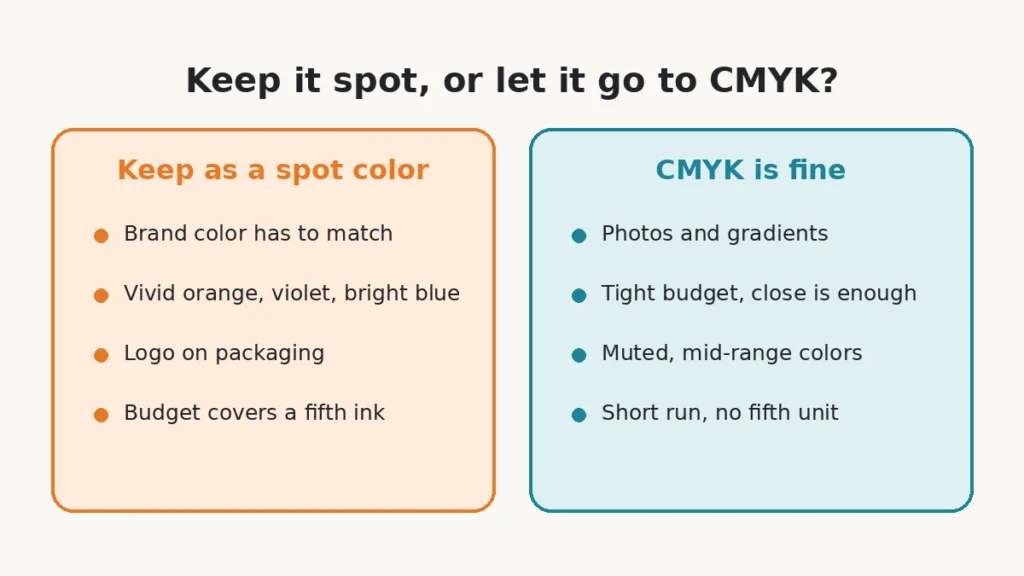
Keep it spot when the color has to be right. Let it go to CMYK when close will do.

Large-format printing leans the same way. One Adobe forum expert said the RIP software behind those machines generally handles a Pantone spot better than a hand-converted CMYK value.

The catch is money. A spot ink needs an extra unit on press, and not every budget has room for one. For muted colors, a close CMYK build is a fair trade. For a vivid orange, it usually isn't.

Frequently asked questions

Is there an exact CMYK to Pantone conversion?

No. Pantone colors are pre-mixed spot inks and CMYK is a blend of four process inks, so every conversion is an estimate. Some colors land very close. Vivid oranges and violets often don't, because they fall outside what CMYK can print.

Should I use Pantone coated or uncoated?

Use whichever matches your paper. The same Pantone number looks different on coated and uncoated stock, which is why Pantone sells a guide for each.

Why does my Pantone color look different on screen?

Screens mix light in RGB, so they can only imitate a Pantone ink. Pantone's own website says the colors it shows on screen are computer simulations. For any real decision, use a printed swatch book.

Can I convert a full-color CMYK image to Pantone?

Not automatically. Halftones and gradients can break into well over a thousand colors. One designer on a CorelDRAW forum hit 1,558 of them, and the advice was to cut the artwork down to a handful of solid colors first. Then match those.

What does PMS stand for?

PMS stands for Pantone Matching System. It's the standardized library of numbered spot colors that printers, designers and brands use to specify an exact ink.

Is there a free CMYK to Pantone converter?

Yes, several online tools do it, and Photoshop and Illustrator have built-in Pantone libraries. All of them return the nearest match, usually with a Delta E score. None replaces checking a printed swatch book.

What's the difference between spot color and process color?

A spot color is one pre-mixed ink, like a Pantone. A process color is built from cyan, magenta, yellow and black ink printed as dots. Spot colors reach a wider range, and process colors cost less to run.

Can I convert Pantone to CMYK?

You can get the closest CMYK build, but not a perfect one. Use Pantone's Color Bridge values or your printer's press profile, and keep vivid colors as spot inks if the match has to be exact.

The short version

Find the nearest match, check it on paper, and let the printer have the last word. Be wary of any tool that promises an exact answer. It's guessing.
Scroll to Top